Make or Zapier: which saves a UK sole trader more time and money?

Affiliate note: Some links are affiliate links; we may earn a commission at no extra cost to you. Affiliate disclosure.
Our pick
Make for a multi-step job on a small budget
Who it suits: a sole trader whose workflow has several steps and whose volume is still modest.
Pros
- The free plan includes routers and filters, with two active scenarios and 1,000 credits a month.
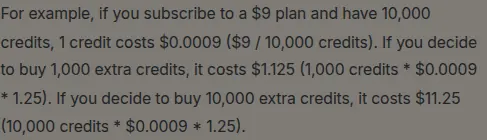
- Core, the first paid plan, starts at $9 a month for 10,000 credits.
Cons
- The canvas is easier to get lost in. A Trustpilot review on 19 September 2026 described a setup that went in circles even with the AI helper.
- Zapier is the simpler builder for a genuine two-step job, and its pricing page lists 9,000+ apps against Make’s 3,500+.
Best for a multi-step job on a small budget: Make. The free plan includes routers and filters, and the first paid plan starts at $9 a month for 10,000 credits.
Best for a two-step job you want live this afternoon: Zapier. The free plan is one trigger and one action, the app list is larger, and the builder is the simpler of the two. We do not earn from Zapier.
| When | Named in the article |
|---|---|
| The job is two steps, you want it running the same day, or the app is on Zapier’s larger list | Zapier |
| Some logic-heavy workflows, because Filter, Formatter and Path do not count as tasks | Zapier |
| The workflow has several steps and the volume is still modest | Make |
Both tools move data between the apps you already use. The bill is the part that catches a sole trader. Make and Zapier count that usage differently, and the free plans stop in different places. Prices below are in US dollars, as the vendors publish them.
What public reviews say
These are third-party scores, read in October 2026. They are other people’s reviews. Occono has not collected them, and they will move.
| Source | Make | Zapier |
|---|---|---|
| Capterra, page last updated 29 September 2026 | 4.8 out of 5, 409 reviews | 4.7 out of 5, 3,083 reviews |
| G2, read October 2026 | 4.6 out of 5, 332 reviews. This is G2’s Italian product page. The English page did not return a score when checked. | No G2 score is listed here. The English G2 page did not return a rating when checked. |
| Trustpilot, read October 2026 | 2.7 out of 5. The page description says 172 people have reviewed Make. Trustpilot’s title for that score is “Poor”. | 1.3 out of 5, 323 reviews. Trustpilot’s title for that score is “Bad”. |
Capterra’s buyers rate both tools highly. Trustpilot, which anyone can write on, is much harsher, and harsher still on Zapier. Read both. A sole trader who hits a billing dispute is closer to the Trustpilot crowd than to a software-buyer survey.
Trustpilot’s own summary of 70 recent Zapier reviews, on the page checked in October 2026, describes unhelpful support, a no-refund stance, unexpected renewals, and workflows that took hours to get right. A few reviewers on that same summary were glad when a support request was fixed quickly.
“The pricing gets expensive pretty quickly and it makes starting with automation more expensive than it needs to be.”
Milly B., founder, one employee, on Capterra’s Zapier page. Checked October 2026.
“It takes a bit of learning, but the AI also helps work out what's wrong. … It had the integration I needed to connect two parts without paying as much as Zapier.”
Charles A., creative director, Capterra review of Make, 18 February 2025, on the Make reviews page. Checked October 2026. That is one reviewer’s price comparison, from early 2025.
“What a complex rubbish automation to set up. Even with the assistance of AI we were going around in circles.”
Trustpilot review, 19 September 2026. Link to the review.
What you actually get
Checked 20 October 2026 on each vendor’s own pricing and help pages. A credit and a task are similar ideas with different exceptions, so the rows are the published limits.
| Make | Zapier | |
|---|---|---|
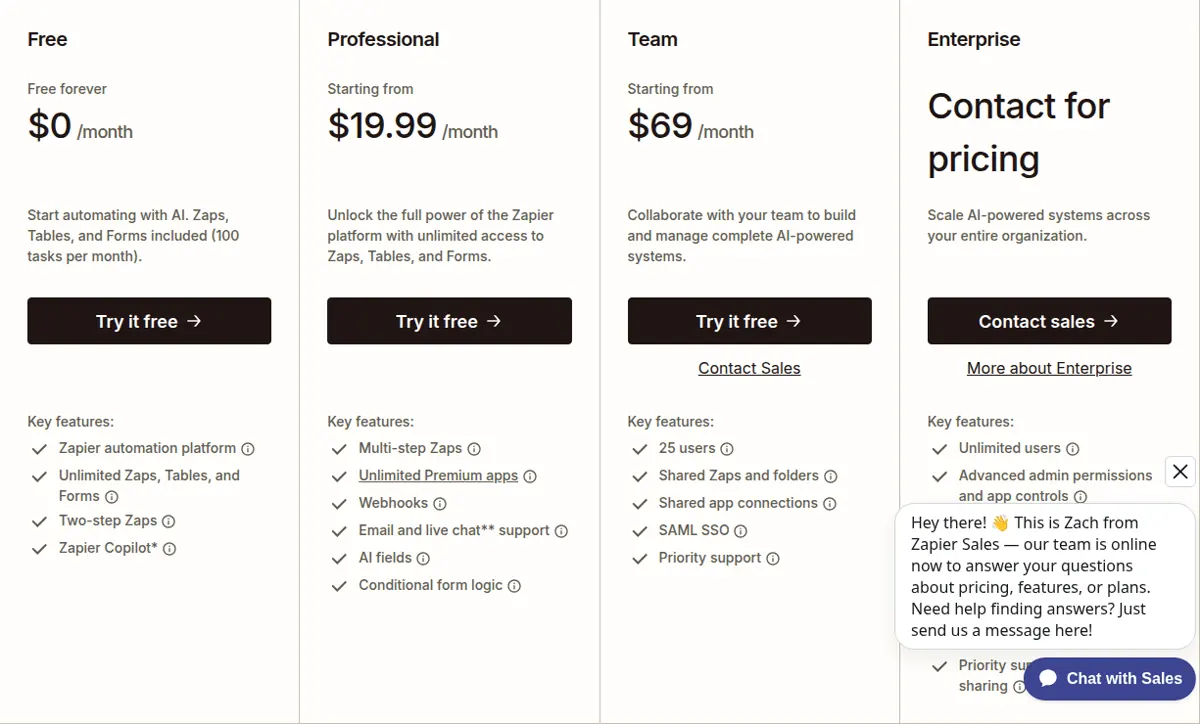
| Free plan allowance | 1,000 credits a month. No time limit. Two active scenarios. | 100 tasks a month. As many Zaps as you want, each limited to two steps. |
| What a run spends | Most module actions cost one credit, including a read, a search, or a transform. The router and the error-handler modules cost none. | A successful action costs one task. The trigger does not. Filter, Formatter, and Path do not count as tasks. |
| Multi-step on the free plan | Yes. Routers and filters are on the free plan, inside the two-scenario and 1,000-credit limits. | A free Zap is one trigger and one action. A second action needs a paid plan. |
| How often it can check | Free: at best every 15 minutes. Core and above: every minute. | Free: polling every 15 minutes. Paid plans: as often as every minute. |
| Apps | 3,500+ apps on the pricing page. | 9,000+ apps on the pricing page. Some apps are premium and need a paid plan. |
| First paid plan | Core, from $9 a month, starting at 10,000 credits. Unlimited active scenarios and access to the Make API. | Professional, from $19.99 a month billed annually. The 750 tasks are from Zapier’s pricing help article, not the pricing cards. Multi-step Zaps and premium apps. |
| Next published plans | Pro from $16 a month, Teams from $29 a month, each starting at 10,000 credits. Higher credit tiers cost more. Make does not print those higher prices on the comparison table. | Team from $69 a month billed annually. The pricing page says “starting from”, so a larger task allowance costs more. |
Make limits: make.com/en/pricing. Make’s published plan prices: Make’s comparison page, and the $9 plan for 10,000 credits is the worked example in Make’s extra-credits help. Zapier free-plan rules: Zapier help, updated 21 August 2026. Zapier prices: zapier.com/pricing. The 750-task figure is from Zapier’s pricing help article, not the pricing cards, updated June 2026. Checked 20 October 2026.

The offer
Make. Free plan with no end date: 1,000 credits a month and two active scenarios. The pricing page does not list a separate trial of the paid plans. Core starts at $9 a month for 10,000 credits. Annual billing is cheaper than monthly; the page says so and does not print the discount in the text. Make also advertises a start-up plan, 50% off its Business plan, for teams under 20 employees. You have to check whether you qualify on Make’s pricing page.
Zapier. Free plan: 100 tasks a month and two-step Zaps. A new account gets a 14-day trial of Professional with no credit card, then drops to the free plan if you do not upgrade. Professional starts at $19.99 a month when billed annually. The 750 tasks are from Zapier’s pricing help article, not the pricing cards. Team starts at $69 a month when billed annually. Source: Zapier’s pricing page for the prices, and the June 2026 pricing help article linked above for the 750 tasks.
Which one fits you?
The complaints that show up in public reviews are the same ones a one-person business hits: the bill climbs, and the builder takes an evening you do not have. Milly B., quoted above, is a founder with one employee. Charles A. switched because the connection he needed was cheaper on Make, and he still said it takes a bit of learning.
A tradesperson chasing quotes. You sent the price, then you were on another job. One reminder from a spreadsheet is a two-step job: new row due, send one email. That fits Zapier’s free plan, inside 100 tasks a month. The quote chase on this site sends two different emails from one sheet, which is more than one action. Zapier’s free plan stops there. Make can branch that inside one scenario, until the two-scenario cap or the 1,000 credits run out. A search of the sheet spends credits before the email goes out.
A coach who has just sold a place. The payment should add a row, tag the person, and send the joining note. That is more than one action, so it needs Zapier Professional, from $19.99 a month billed annually. The 750 tasks on that plan are from Zapier’s pricing help article, not the pricing cards. On Make it is one scenario. Whether it stays on the free plan depends on how many module actions each sale actually runs. If the welcome note is the only step you care about, Zapier’s habit of not charging for the trigger, or for a filter, can keep the task count down.
A shop owner with one awkward app. If the tool that holds your orders is among Zapier’s 9,000+ apps and missing from Make’s 3,500+, Zapier is the one that saves the evening. If that app is marked premium, it still needs a paid Zapier plan. If both tools connect and the job is a single action, Zapier’s free plan is the faster setup. If you will add a second action next month, price Make’s Core plan at $9 before you accept Zapier’s $19.99.
Where Zapier is the better buy
Zapier wins when the job really is two steps, when you want it running the same day, and when the app you need is on Zapier’s larger list. It also wins on some logic-heavy workflows, because Filter, Formatter, and Path do not count as tasks, while a similar branch on Make spends credits. Trustpilot’s 1.3 from 323 reviews is the reason to watch the renewal. Turn off pay-per-task billing if you do not want an overage, and read the plan before the 14-day trial ends.
Make wins when the workflow has several steps and the volume is still modest. Two free scenarios and 1,000 credits cover a quote chase. Core at $9 for 10,000 credits is the first paid step if those two scenarios are not enough. The Trustpilot review from 19 September 2026 is the fair warning: the canvas is easier to get lost in, and a public review that month called the setup a waste of hours even with the built-in AI helper.
Pick one. Running both means two bills and two places for a broken login to hide.
Affiliate note
Occono may earn a commission when you buy through links on this site, at no extra cost to you. The Zapier links on this page are not affiliate links. Affiliate disclosure.
By subscribing you agree to receive Occono emails. You can unsubscribe at any time. See our privacy notice.
Update details
- — Published.
- — Rewritten around the vendors’ published offers.
- — Canonical URL and article sidebar added, and this update note added.
- — Screenshots of the public pages added.
- — Prices rechecked against vendor pages, 20 October 2026.